SECTION 11: Create Your Church Website Menu Navigation
Now that you at least have a starting point for a plan to create the content and pages for your site, you will need to make it easy for people to access those pages and get around.
Creating a Main Navigation Menu is your first step toward accomplishing this.
You may want to add other section specific menus in your sidebar using widgets later, but if your main navigation is setup people will be able to find what they need.
Sometimes Themes can make change how this process works. You may have to setup your menus in your Theme Options panel for example. But I am going to walk you through the most likely way you will need to do it.

Go to “Appearance” then “Menus”. Go to “Manage Menus” to check and see if there is an option already setup for you to select as your “Primary Navigation”. This will most likely be in the form of a drop-down menu choice. There may already be a “Main Nav” Menu created that is ready for you to use.
If there is not a “Main Nav” Menu setup, go to “Edit Menus” and click to “create a new menu”. Name is whatever you like. Then go back to “Manage Menus” and assign the menu you just created as the “Primary Navigation. Then you can go back to “Edit Menus” and begin to build your navigation.
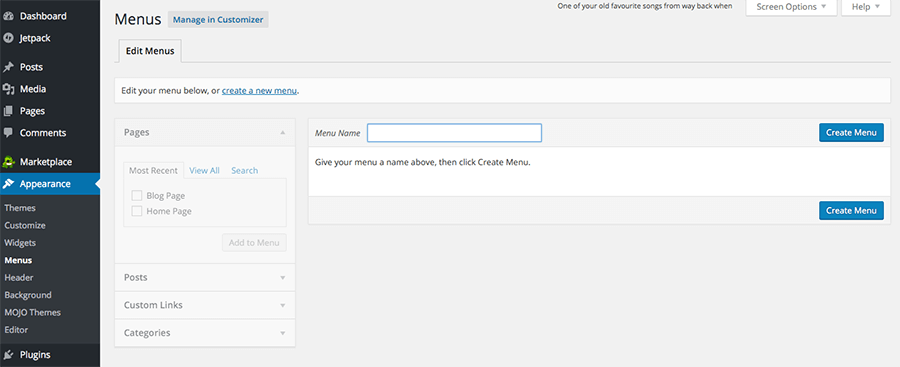
Any Page, Post or Category can be added to your Menu. You can also create a Custom Link to link to a website outside of yours. Just choose Custom Link and add the text that you want to be visible as well as the link.
After you choose the Pages, Posts, Categories or Custom Links on the left, they will show up at the bottom of the list in the Menu creation area.
You can then drag these boxes anywhere in the Menu you want. If you want to create a submenu, drag a box below the link you want it to be under and move it to the right a little. It will become a submenu item of whatever you have above it, and you can stack more under that one until your submenu is complete.
One other note about creating submenus. If you want a main section link in the menu to NOT be linked to anything, create a custom link with the section name text and a # sign in the place where the link should be. This will allow it to show up, but not linked to anything.
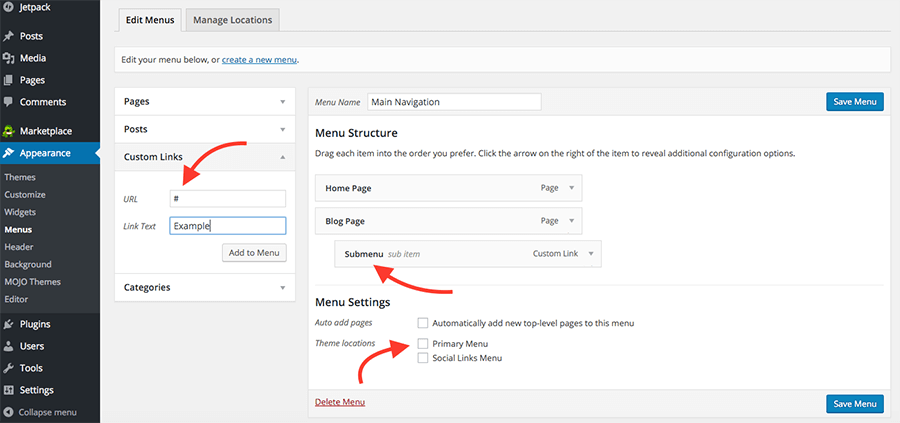
In addition, after you have your Menu setup you can go any link and change the text even on existing pages and posts to make your Menu function better. For example, if you have a really long page name that is too long for the Menu area you can shorten it.
Setting up your navigation in a way that is complete and makes sense to the person using your site is critical to the usability of your website.