4: Before You Start… Do This!
Before we begin creating accounts, claiming online directory listings and optimizing the online presence of our church, there are a few steps you need to take to make the process easier.
You will potentially be creating many logins and setting up a lot of free accounts.
You will not only need a place for this information to be stored, but you will also need an email address to keep this separate from your personal and church email accounts.
1 – Setup a FREE Church Gmail Address
Even if you have a personal Gmail account, you will want to begin by setting up a FREE Gmail / Google account for your church. If you already have a church Gmail address you can use that.
However, just know that once you sign up for these accounts you may receive a lot of email ads to upgrade the individual site services from free to paid. If you do not want to deal with this extra email I would suggest creating another one just for your church online marketing efforts. You can still forward this marketing Gmail to your regular church email address and create a folder to store all of that email.
You can use any email address to complete the steps and create the accounts needed for most of the local promotion process. However, for certain steps like setting up your Google Business Page, Google Maps and your YouTube channel, you will need a Google Gmail account anyway.
So, you might as well get the benefit from using Gmail right from the start.
To make it simple, I would try for something similar to your Church name and add the word online to it. So you could try for yourchurchnameonline@gmail.com and see if that is available. An example would be firstbaptistdallasonline@gmail.com. It does not really matter how long it is as you will not be using this email address publicly. You will only use it for these marketing and promotional accounts.
In addition to creating a separate email for business directories and other accounts to connect to, you will also get access to many other free products and services by creating the Gmail account.
These products and services include YouTube, Google Hangouts, Drive, Voice, Forms, Translate, Calendar, Docs, Earth, Business and more. For a more complete list of links, apps and free services visit the Google Apps Page HERE.
One last advantage of creating a church Gmail address and Google account for your church is automatic logins.
Many other Services that you may use like Hootsuite, Canva and Feedly will let you login using your Gmail account so that you do not have to remember as many usernames and passwords. That is very helpful and will save you time.
Setup your Church marketing Gmail email address now and begin use it throughout the process.
Gmail Link >> www.Gmail.com
2 – Download and Fill In your Local Promotion Resource Document
Click the Local Promotion Resource Document screenshot to download the Microsoft Word file you can use as a template to begin filling in information about your church and saving account information all in one place.
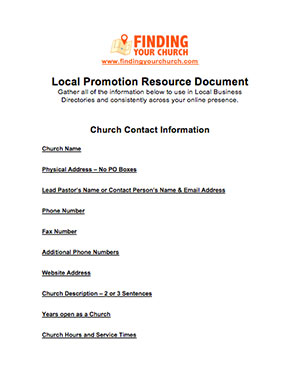
You will use this one document throughout the process.
You will add your Church Contact Information, Google Business Page and Local Business Directory account information, Local Website links, Radio & TV Stations links, Social Media logins and Community Calendar links.
You do not have to use this specific document. The important thing is that you keep all of this information in ONE place.
You can also use free services like Google Drive and Evernote to keep this information in as well.
The important thing is that you keep a record of your account logins, and as much as possible, everything you have done to improve your online presence all in ONE place.
This document will be valuable for you, but also for potential volunteers that you want involved in the process.
It is very frustrating for you when you need to change information in an account to have to hunt down login details in your email or constantly have to send a request for a lost password.
Plus, it is much easier to pass on to a volunteer if it is all in one document. Even if you only need to give a volunteer access to part of your login list, it is still easier if you have it ALL in one location.
3 – Gather your Church Contact Information, Church Logo, up to 10 Pictures & a YouTube Video Link
Google Business and other Local Business Directories are all different and each allow you to add different information, pictures and links, but all should allow you to add a Church Logo at the least.
Gather a quality version of your Church Logo, 10 great pictures and a YouTube video link to be ready in advance.
You will want to store these in an easily accessible place. A great spot for these would be in your new Gmail account Google Drive.
Go to Google.com/Drive and login with your new church marketing Gmail address and drag and drop to upload. Using Google Drive or a free Dropbox.com account will allow you or a volunteer to access the pictures and logo from any computer.
Be sure to complete these simple steps and fill in the Church Contact Information section or your Local Promotion Resource Document before moving on to the next step.
It will save you a lot of time and frustration as you move through the process.
Do you need help creating a new Church Logo or Video?
Fiverr is an excellent resource to get cheap, but usually very quality, creative work done starting at around $5.
Hundreds of creative and technical people from around the World are available to do projects like this for you very cheap. If not for $5, then very close. But you still can typically get someone to create logos and simple videos for around $5.
>> CLICK HERE to get your FREE FIVERR Account <<